|
|
|
Term 4 Final Project: Business Web Site Phases 2 & 3: Site Map, Color & Fonts |
|||
| Overview > Phase 1 > Phase 4 > Phase 5 > Phase 6 > | |||
|
Recommended Reading: Web Menus With Beauty and
Brains Wendy Peck also writes a great weekly
column for |
 |
||
|
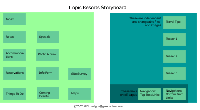
Click for 760x460 image Dreamweaver Site Map View: Final Project |
A site map
or storyboard is much easier to create if all the menu areas for a site
are determined first. It is important to work closely with the client and have them sign off on the completed map. Changes made after navigation images and interior comp pages are created are very time consuming to correct. Many designers charge extra for changes to the site map after a certain point in the design process. Usually after the final comp has been approved. |
||
|
|
|||
|
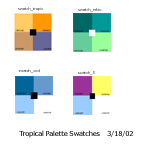
Four possible color "moods" for the Tropic Resorts site. Color swatches combined into a "palette" in Photoshop. |
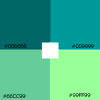
Swatch "relaxed" used in comp 1 & 2 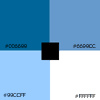
Swatch "cool" used in comp 3
|
A good site design will set a consistent
mood throughout the entire site. The mood for this site will emphasize a light, warm tropical feel. Features important to advance the mood required are: good jpgs; nice
color combo; fun, casual fonts and graphics. |
|
 It was decided to set a fun, casual mood for the graphic fonts. "Ravie" was chosen for all graphic menu fonts. Regular text font Verdana was chosen for its good readability at small sizes. Renders well on the Web and keeps download size small as screen graphic fonts are not needed. |

The client had a logo already in use.
It was incorporated in the site design. |
||
|
|
|||
|
Menu Planning: Menus should look balanced with the rest of the page Always include a text navigation area for users with accessibility issues on each page of the site. Menu Types:
|
Menu
areas for Tropic Resorts, inc.:
|
||
Home
| Designs |
Current Projects
| Resume
| Related Links